ProductsPilot Review: Is This AI Digital Product Tool Worth It?
Creating a digital product sounds simple until you actually try to build a business around it.
First, you need an idea people might buy. Then you have to create the product, format the files, make attractive mockups, write the listing, choose a price, upload everything to a marketplace, and somehow get people to see it.
That is a lot of work for someone who may have started with nothing more than an idea for a printable planner or Etsy shop.
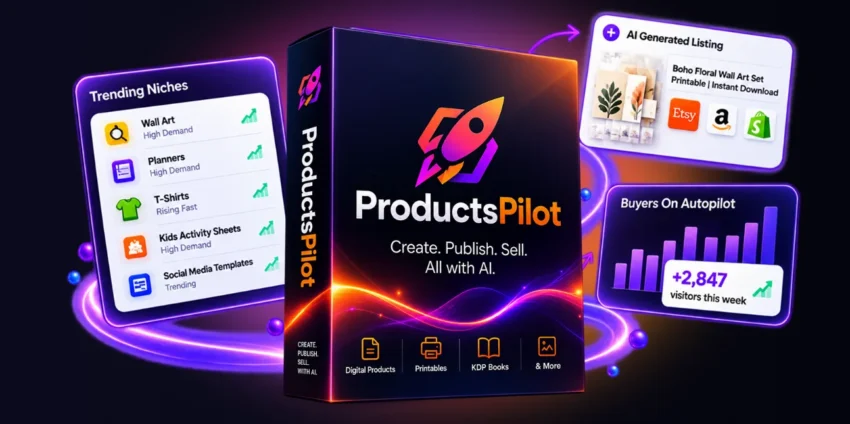
ProductsPilot takes a different approach. Instead of focusing only on AI-generated designs, it tries to connect several parts of the digital-product workflow in one place: niche research, product creation, marketplace listing preparation, mockups, and organic traffic generation.
That sounds useful. But it also raises an important question: does putting all these steps into one platform actually make selling digital products easier?
In this ProductsPilot review, I will break down what the software offers, how its workflow fits Etsy and Gumroad sellers, what you get for the current front-end price, where the limitations are, and who should—and should not—consider buying it.
The goal here isn’t to tell you that an AI tool will magically create passive income. It won’t.
The more useful question is whether ProductsPilot can remove enough repetitive work to make a digital-product business easier to start and manage.
Quick ProductsPilot Overview
| Category | Details |
|---|---|
| Product Name | ProductsPilot |
| Product Type | AI Digital Product Creation & Marketing Software |
| Best For | Etsy sellers, digital-product beginners, creators and online entrepreneurs |
| Main Workflow | Research → Create → Listing → Traffic |
| Marketplace Focus | Etsy and Gumroad |
| Product Creation | AI-assisted digital product creation |
| Mockups | Lifestyle-style product mockups |
| Listing Support | Titles, descriptions, tags, categories and pricing guidance |
| Traffic System | Seven organic traffic channels |
| Front-End Price | $37 at the current launch offer |
| Front-End Product Limit | 15 complete products per month |
| Shops | 2 shops |
| Commercial Rights | Included according to the current offer |
| Refund Policy | 14-day money-back guarantee stated in the offer |
| Best Reason to Consider It | Combines several digital-product tasks in one workflow |
Important: Pricing and included features can change during or after a launch. Check the current offer before purchasing.
What Is ProductsPilot?
ProductsPilot is an AI-powered platform designed around the digital-product business model.
The basic idea is straightforward.
Instead of using one tool for product research, another for design, another for mockups, another for listing copy, and several more for promotion, ProductsPilot attempts to bring much of that workflow together.
The platform is built around four major jobs:
- Finding product opportunities
- Creating digital products
- Preparing marketplace listings
- Helping generate organic traffic
This makes it different from a basic AI image generator.
For example, suppose you want to sell printable products on Etsy.
A traditional workflow might look something like this:
Google Trends or marketplace research → ChatGPT → Canva → image/mockup tool → keyword research → Etsy listing → social media → Pinterest
ProductsPilot attempts to shorten that chain.
You start with a niche or product idea, select a style, generate the product set, prepare marketplace information and then use the built-in traffic workflow.
That doesn’t mean everything happens without human involvement. In particular, marketplace publishing and quality control still matter.
But reducing repetitive work is where the platform’s appeal becomes clear.
How ProductsPilot Works
The easiest way to understand ProductsPilot is to follow the workflow from beginning to end.
1. Find a Digital Product Opportunity
One of the first problems digital-product sellers face isn’t design.
It’s deciding what to make.
You can spend hours creating a beautiful planner and discover that the market is already crowded or that buyers aren’t particularly interested in your specific idea.
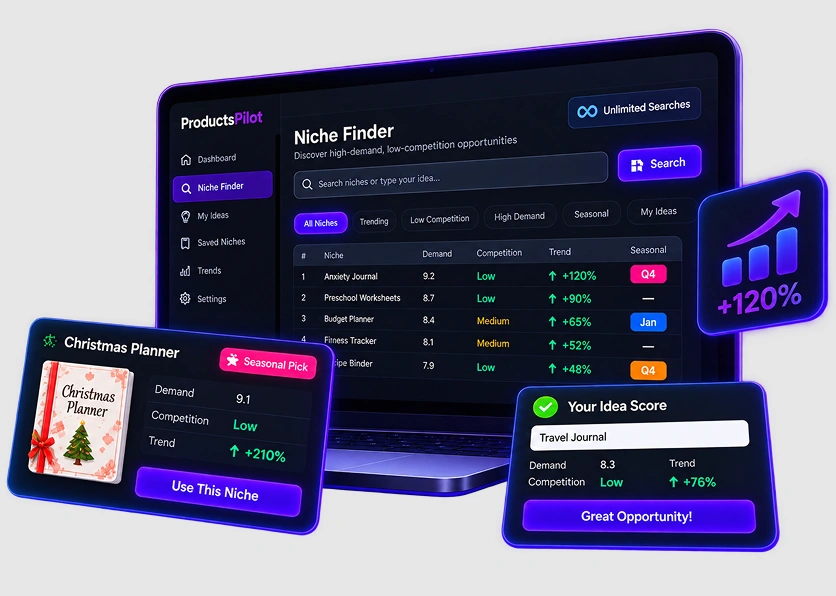
ProductsPilot’s Niche Finder is designed to address this problem.
The platform presents niche opportunities with demand and competition information, allowing users to research before spending time creating a product.
It also includes seasonal intelligence, which can be useful for products related to holidays, events, seasons and annual buying cycles.
That’s a better starting point than simply telling an AI:
“Give me 20 digital product ideas.”
Ideas are easy.
Finding ideas with a reasonable commercial opportunity is much more useful.
2. Create the Product
Once you have selected a niche, ProductsPilot moves into the product creation stage.
The platform is designed to generate complete product sets rather than simply producing one random AI image.
Depending on the selected product category, the workflow can support products such as:
- Digital planners
- Printable products
- Wall art
- Invitations
- Worksheets
- Templates
- Journals
- Budget planners
- Calendars
- Educational materials
The platform also provides style directions so that the different pieces can look like part of the same product collection.
That matters.
Imagine selling a 20-page printable planner. If every page has a completely different visual style, the product can feel assembled rather than designed.
Consistency can make a digital product look more professional.
3. Prepare Print-Ready Files
Another useful part of the workflow is file preparation.
The current offer describes print-ready files, multiple sizes, US Letter and A4 formats where applicable, and features such as bleed and trim marks for supported products.
For someone experienced with design software, these aren’t difficult tasks.
For a beginner, they can become surprisingly frustrating.
A buyer doesn’t care that you spent six hours making the product.
They care whether the file opens correctly, prints properly and looks like the product shown in the listing.
That makes file preparation more important than it might initially seem.
4. Generate Product Mockups
A digital download can be difficult to visualize.
A plain PDF thumbnail doesn’t necessarily communicate what the customer will receive.
ProductsPilot can create lifestyle-style mockups to help present digital products in a more realistic setting.
For example, a printable wall-art design can be shown in a room rather than as a flat image.
A planner can be presented as part of a desk setup.
This is useful because the mockup becomes part of your sales presentation.
However, I would still inspect every generated mockup before publishing.
AI-generated presentation images can occasionally contain awkward cropping, visual inconsistencies or representations that don’t accurately match the actual product.
The mockup should sell the real product, not an imaginary version of it.
ProductsPilot Listing Agent
Creating a digital product is only half the job.
The next challenge is getting it listed correctly.
This is where ProductsPilot’s Listing Agent becomes particularly useful.
The platform can prepare marketplace-oriented information such as:
- Product titles
- Descriptions
- Tags
- Categories
- Attributes
- Suggested pricing
- Marketplace-specific listing information
It supports listing workflows for Etsy and Gumroad on the front-end offer.
This is important because Etsy and Gumroad aren’t identical.
Etsy depends heavily on marketplace search and listing relevance.
Gumroad often puts more emphasis on a creator’s own audience and external traffic.
So simply copying the same description to both platforms isn’t necessarily the best strategy.
ProductsPilot attempts to prepare the information for the specific marketplace.
Does ProductsPilot Automatically Publish to Etsy?
This is one area where buyers need to understand the difference between automation and assistance.
ProductsPilot can prepare the Etsy listing information, but that does not mean the software completely takes over your Etsy account and publishes everything without you.
The Etsy workflow still requires user involvement.
That’s actually something I would consider a positive from a control perspective.
You can review:
- The images
- Title
- Description
- Tags
- Category
- Price
- AI disclosure
- Final listing
before publishing.
Gumroad has a more direct publishing workflow according to the current product materials.
So don’t buy ProductsPilot expecting a completely hands-free Etsy store.
It is better understood as an AI-assisted product creation and selling workflow.
ProductsPilot Traffic Builder
This is one of the more interesting parts of the platform.
Many digital-product tools stop once the product is created.
But having a product doesn’t mean customers will find it.
ProductsPilot includes a Traffic Builder designed around seven organic traffic channels.
These include areas such as:
- Pinterest content
- Social media content
- Google Web Stories
- Free PDF guides
- Short-form video distribution
- Q&A outreach
- Link-building and guest-post outreach
The exact level of automation differs between channels.
Some content can be generated or prepared automatically, while outreach activities may still require you to review, approve and publish or send the material yourself.
That’s an important distinction.
You shouldn’t interpret “traffic automation” as “guaranteed visitors.”
Traffic still depends on:
- Product quality
- Search demand
- Competition
- Content quality
- Marketplace ranking
- Account authority
- Audience fit
- Consistency
ProductsPilot can reduce the amount of work involved in promotion.
It cannot manufacture genuine buyer demand.
Real-World Workflow: What Using ProductsPilot Is Likely to Feel Like
The biggest practical advantage of ProductsPilot is not one individual feature.
It’s the fact that the workflow is connected.
Imagine you’re a beginner who wants to create an Etsy printable.
Without an all-in-one system, you might spend one evening researching products, another day designing, another few hours preparing mockups, and another session writing listings.
The work becomes fragmented.
With ProductsPilot, the intended workflow is more like:
Research a niche → choose a product direction → generate the product → review the files → create mockups → prepare listing → publish → promote
That is easier to understand.
For an experienced seller, this can mean less repetitive work.
For a beginner, it can also make the process feel less overwhelming.
But there is an important catch:
You still need to think.
You need to choose a sensible niche.
You need to inspect the generated product.
You need to make sure your listing accurately represents what you’re selling.
You need to understand marketplace rules.
And you need to learn basic marketing.
Automation is useful when it removes repetitive work.
It becomes dangerous when it removes judgment.
ProductsPilot for Etsy Sellers
Etsy is probably the audience most naturally aligned with ProductsPilot.
Digital products such as planners, printables, wall art, invitations, templates and educational resources fit naturally into the marketplace.
ProductsPilot can help Etsy sellers with several parts of the workflow.
Product research
You can research potential niches before creating products.
Product creation
You can generate coordinated digital products rather than starting every design from scratch.
Mockups
You can create visual presentations for your listings.
Listing preparation
You can generate titles, descriptions, tags and other listing information.
AI disclosure
The platform includes functionality designed to help with Etsy’s AI disclosure requirements.
However, don’t treat this as legal protection.
If you sell on Etsy, you remain responsible for complying with Etsy’s current policies and intellectual-property rules.
A software tool’s trademark screening is helpful, but it isn’t a substitute for your own due diligence.
ProductsPilot for Gumroad Sellers
Gumroad is another natural use case.
Gumroad works particularly well for creators selling downloadable products such as:
- eBooks
- Guides
- Templates
- Checklists
- Educational resources
- Creative assets
- Digital bundles
ProductsPilot can prepare Gumroad-oriented listing information and provides a more direct publishing workflow than the guided Etsy process.
For Gumroad sellers, the Traffic Builder can also be relevant because Gumroad creators often need to generate traffic outside the marketplace itself.
If you already have a YouTube channel, email list, social audience or website, this can make the system more useful.
ProductsPilot Pricing
At the time of this review, the front-end ProductsPilot offer is listed at $37 as a launch price.
The front-end package includes features such as:
- 15 complete products per month
- Eight product categories
- Two shops
- Niche research
- Product creation
- Print-ready files
- Mockups
- Etsy listing packs
- Gumroad listing support
- Traffic Builder
- Commercial rights
There are also additional upgrades and bundle offers.
For example, an Unlimited option is offered separately for users who need more product creation capacity.
This is important because the $37 price should not automatically be interpreted as the total cost of every possible feature.
If you only need the front-end workflow, the entry price may be enough.
If you’re planning to build a large product catalogue or need additional marketplace, storefront or agency functionality, the upgrade funnel becomes more relevant.
Always check the current checkout page before purchasing because launch pricing and upgrade structures can change.

ProductsPilot Pros and Cons
Pros
1. Research Comes Before Creation
This is one of the strongest parts of the concept.
Starting with demand and competition is generally more sensible than creating random products and hoping someone buys them.
2. Multiple Tasks in One Platform
Research, product creation, mockups, listing preparation and traffic support are connected.
That can reduce tool-hopping.
3. Beginner-Friendly Workflow
You don’t need to be an advanced graphic designer to understand the basic workflow.
4. Etsy and Gumroad Support
These are two practical destinations for digital products.
5. Product Sets Instead of Just Individual Images
The platform focuses on complete digital products and coordinated sets.
That makes more sense for a real digital-product business.
6. Organic Traffic Focus
The Traffic Builder gives users ideas and assets for promoting products without relying entirely on paid advertising.
7. Commercial Rights
The current offer states that buyers receive commercial rights to the products they create, subject to the applicable license terms.
Cons
1. It’s Not a Guaranteed Income Machine
This is the biggest point to remember.
Generating a product doesn’t guarantee sales.
2. The Front-End Has a Product Limit
The current front-end package is described as supporting 15 complete products per month.
Heavy users may need an upgrade.
3. Etsy Still Requires Manual Work
ProductsPilot can prepare the listing, but you remain responsible for reviewing and publishing it.
4. AI Output Still Needs Quality Control
You should inspect products, mockups, descriptions and pricing suggestions before publishing.
5. Additional Features Cost Extra
The initial price doesn’t necessarily unlock every upgrade in the funnel.
6. Marketplace Rules Still Apply
ProductsPilot doesn’t remove your responsibility for Etsy, Gumroad or intellectual-property compliance.
ProductsPilot vs Using Separate AI Tools
A fair comparison isn’t necessarily another single software product.
For many beginners, the real alternative is to assemble their own toolkit.
| Task | ProductsPilot | Separate Tools |
|---|---|---|
| Niche research | Built into workflow | Research tool required |
| Product creation | Built in | AI/design tool required |
| Mockups | Built in | Separate mockup tool |
| Listing copy | Built in | ChatGPT or copywriting tool |
| Etsy workflow | Guided | Manual |
| Gumroad workflow | Supported | Manual |
| Traffic resources | Built-in system | Multiple tools/workflows |
| Learning curve | Lower for beginners | Can be higher |
| Flexibility | Depends on platform | Very high |
| Tool management | One ecosystem | Several subscriptions/tools |
Which Approach Is Better?
If you’re already comfortable using ChatGPT, Canva, keyword tools, mockup generators and marketing platforms, buying an all-in-one system may not be essential.
You may prefer having complete control over every part of the process.
But if you’re a beginner who finds the number of tools confusing, ProductsPilot’s biggest advantage is convenience.
You’re paying for a connected workflow rather than simply paying for an AI image generator.
Who Should Buy ProductsPilot?
ProductsPilot makes the most sense for several types of users.
Beginners Starting a Digital Product Business
If you’re starting from zero and don’t know which tools you need, an integrated workflow can reduce the learning curve.
Etsy Digital Product Sellers
Especially sellers working with:
- Printables
- Planners
- Wall art
- Invitations
- Worksheets
- Templates
Gumroad Creators
Creators selling downloadable resources can use the product creation and listing workflow to speed up production.
Freelancers
Freelancers who create digital products for clients may benefit from reducing repetitive production work.
Existing Sellers Who Want More Products
If you already have an Etsy or Gumroad store and your bottleneck is creating new products consistently, the automation can become more valuable.
Who Should Avoid ProductsPilot?
ProductsPilot probably isn’t the right purchase for everyone.
You may want to skip it if:
You Already Have a Highly Optimized Workflow
If you already use your preferred research, design, mockup, SEO and marketing tools effectively, switching may not save enough time.
You Want Completely Hands-Free Income
This is the wrong expectation.
You still need to make decisions, review products, manage listings and understand your market.
You Don’t Want to Market Your Products
Creating the product is only one part of the business.
Without traffic and promotion, even a good product can sit unnoticed.
You Expect Every AI Output to Be Perfect
AI-generated products should always be reviewed.
If you don’t want to perform quality control, this type of software can disappoint you.
Is ProductsPilot Worth Buying?
The answer depends on what you’re actually buying it for.
If you’re buying it because you believe a $37 software will automatically generate passive income, I wouldn’t recommend that mindset.
If you’re buying it because you want to reduce the amount of repetitive work involved in building a digital-product business, the proposition becomes much more interesting.
The value isn’t really in one magic AI feature.
It’s in the workflow.
Instead of jumping between five or six different tools, you can move through a more connected process:
Research → Create → Package → List → Promote
For a beginner, that simplicity can be valuable.
For an experienced seller, the main question is different:
How much time will it actually save compared with your existing workflow?
That’s what should determine whether the purchase makes financial sense.
Buying Guide: What to Check Before You Purchase
Before buying ProductsPilot, consider these five questions.
1. What Are You Planning to Sell?
Have a product category in mind.
Don’t buy the software first and figure out your business model later.
2. Where Will You Sell?
Decide whether you’re primarily interested in Etsy, Gumroad or another sales channel.
3. Do You Need the Front-End or an Upgrade?
If you’re only testing the business model, the front-end may be enough to start.
If you plan to produce products at scale, check the limits carefully.
4. Are You Prepared to Review AI Output?
You should be.
Never upload a generated product without checking it.
5. Do You Have a Traffic Strategy?
This is perhaps the most overlooked question.
A great product with no visitors can still produce zero sales.
ProductsPilot can assist with organic promotion, but you should still understand SEO, Pinterest, social content, video marketing or another traffic source.
Common Mistakes to Avoid
Mistake 1: Creating Products Without Research
Don’t create 50 products simply because the software makes creation easy.
Research first.
Mistake 2: Publishing AI Content Without Reviewing It
Check spelling, layout, formatting, product claims, mockups and descriptions.
Mistake 3: Copying Competitors
Use successful products as market research, not as templates to reproduce.
Your product should have its own value and positioning.
Mistake 4: Ignoring Intellectual Property
Trademark screening is helpful, but you remain responsible for what you sell.
Avoid building products around protected brands, characters, logos or celebrity identities without appropriate rights.
Mistake 5: Expecting Instant Sales
A digital-product business usually requires testing.
You may need to experiment with:
- Niches
- Titles
- Thumbnails
- Pricing
- Product formats
- Keywords
- Traffic sources
That’s normal.
Frequently Asked Questions
What is ProductsPilot?
ProductsPilot is an AI-powered digital product creation and marketing platform designed to help users research niches, create digital products, prepare marketplace listings and support organic promotion.
How much does ProductsPilot cost?
The current front-end launch offer is listed at $37. Additional upgrades are available, so buyers should review the current checkout page before purchasing.
Can ProductsPilot create Etsy digital products?
Yes. The platform is designed to support digital product creation and provides Etsy-oriented listing packs. Etsy publishing itself still requires user involvement.
Does ProductsPilot work with Gumroad?
Yes. The current offer includes Gumroad listing support and a more direct publishing workflow.
Can ProductsPilot create digital planners?
Digital planners are among the product types the platform is designed to support. The workflow can also support other digital products such as printables, templates, wall art and educational materials.
Does ProductsPilot guarantee sales?
No. No software can legitimately guarantee sales simply because it creates a product. Results depend on demand, product quality, competition, listing quality and traffic.
Is ProductsPilot suitable for beginners?
Yes, the workflow is designed to reduce the number of separate tasks and tools a beginner needs to manage. However, beginners still need to learn basic product research, marketplace rules and marketing.
Do I need to be a professional designer?
No advanced design experience is intended to be necessary for the basic workflow. However, having good design judgment and reviewing AI-generated output will still improve the final product.
Can I sell the products I create?
The current offer states that buyers receive commercial rights for the products they create, subject to the applicable license terms. Always review the current license before using the products commercially.
Final Verdict: Should You Consider ProductsPilot?
ProductsPilot is interesting because it doesn’t try to solve only one part of the digital-product business.
Its real selling point is the connection between research, creation, listing and promotion.
For a beginner who wants to sell digital planners, printables, wall art, templates, invitations or similar products, that connected workflow can remove a lot of the initial friction.
For an existing Etsy or Gumroad seller, the bigger benefit may be speed. If your biggest problem is producing new products consistently, having several repetitive tasks handled in one place can make your workflow more efficient.
But there are limits.
You still need to choose the right market. You still need to check the quality of AI-generated products. You still need to follow marketplace rules. And most importantly, you still need to bring qualified buyers to your listings.
So my view is simple:
ProductsPilot is better evaluated as a digital-product productivity and workflow system—not as an automatic passive-income machine.
If you understand that distinction and you’re looking for a way to streamline the process of researching, creating, listing and promoting digital products, ProductsPilot is worth taking a closer look at.
If you’re expecting the software to create products and guarantee sales without any real business or marketing work, you should probably keep your money.